

Launch & costs
Start a survey run and understand what it costs.
You can launch a survey run as soon as it has a design and a panel. The Overview then shows Ready to start on the Survey step. You always see the price before you launch. Any member of the team can launch.
Launch from the chat
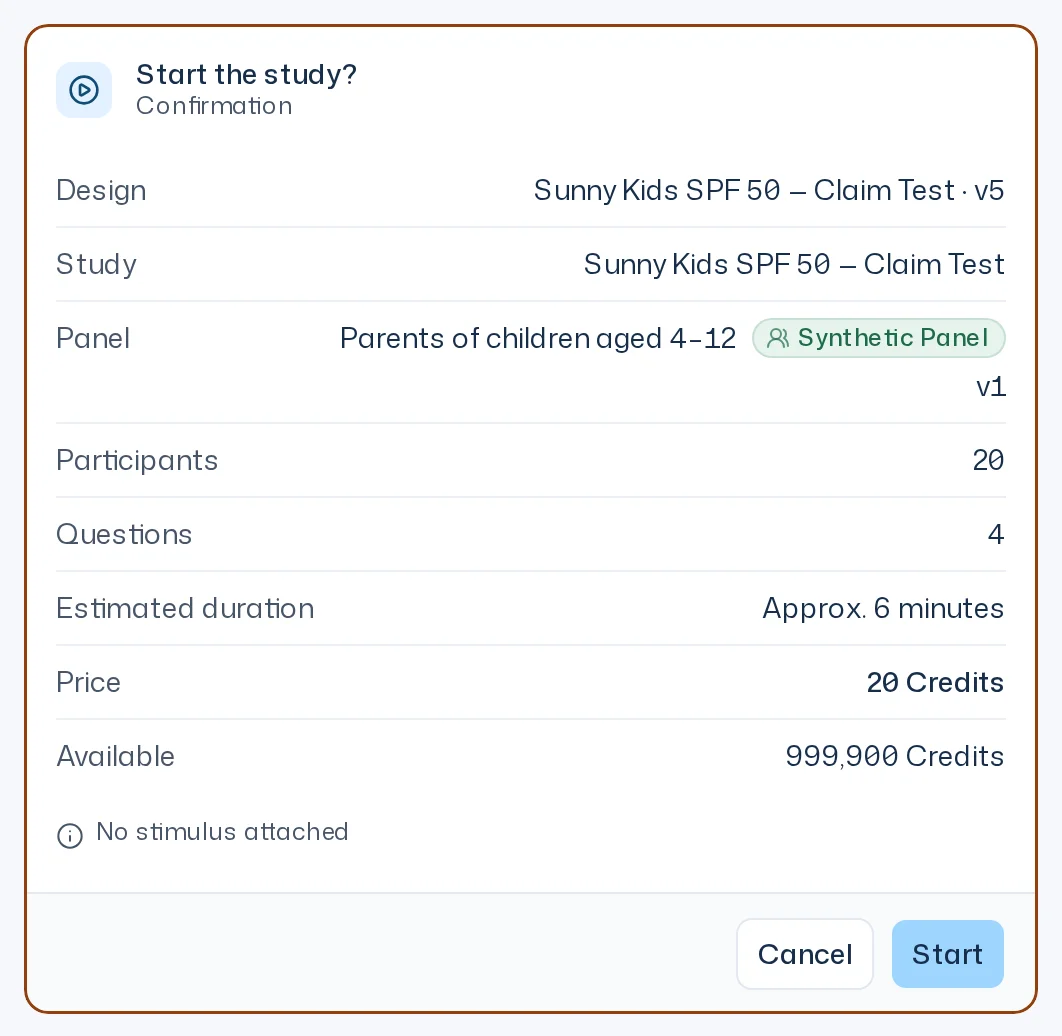
When you ask Iris to start the study, she shows the card Start the study?. Check the rows before you confirm:
| Row | Meaning |
|---|---|
| Design | Name and version of the survey design |
| Study | The study the survey run belongs to |
| Panel | The panel and its version |
| Participants | How many people answer |
| Questions | How many questions are asked |
| Estimated duration | Approximate field time, for example Approx. 12 minutes |
| Price | The cost in credits, rounded up to whole credits |
| Stimuli | Which images or PDFs are shown with which questions |
| Available | How many credits your team has right now, rounded down to whole credits |
Start launches the run at the Price shown, Cancel declines. If the design or the panel changes first, the card expires. If only the price changed, your click starts nothing yet: the card says The price has changed: … instead of … and the button then reads Start for … Credits. More in Tools & approvals.
The design card in the chat has a launch button too: Start survey run · 50 credits.
Launch in the Dock
- Open the study in the Dock. You can't launch on the study page.
- Unfold the survey run and expand its Survey step.
- Check the line above the button, for example 50 respondents · 50 credits · 1,000 available.
- Click Start survey run.
The click launches right away; there is no further confirmation. If the design has no stimulus, No stimulus attached appears next to it. That is only a hint, you can still launch.

After the launch the app says Survey run started. The status briefly shows Confirming start and then Survey running. A Run 1 card appears in the thread and shows the progress. Design and panel are now fixed for this survey run.
If the survey run does not start, the Survey step shows Not started. No Credits were charged. You can launch it again.
What a survey run costs
The price is participants × questions ÷ 15 credits, ten times that with Premium Twins, rounded up to 0.01 credit.
- Participants: the number of respondents in the chosen panel version.
- Questions: the questions in the design. Each counts the same, whether open, scale or choice. The interviewer's follow-ups and stimuli cost nothing extra.
- Panel type: Dynamic Personas count once, Premium Twins ten times.
| Panel | Participants | Questions | Price |
|---|---|---|---|
| Dynamic Personas | 50 | 15 | 50 credits |
| Dynamic Personas | 100 | 10 | 66.67 credits |
| Premium Twins | 50 | 15 | 500 credits |
The card and the Overview show the price rounded up to whole credits, for example 67 credits; the exact value is charged. Adding or removing questions changes the price with it. A repeated survey run is priced by the scope of its frozen design. The credits are reserved at launch and settled when the survey run ends. Your team gets credits back for answers that failed for technical reasons, for a failed survey run and for a cancellation. The rules are in Problems & refunds, the plans and more examples in Pricing and credits.
Generating a panel costs no credits while a free panel slot is left, see Choose a panel. What an ad-hoc question costs is explained in Ad-hoc questions & recontact.
When the launch fails
| Message | What to do |
|---|---|
| There are not enough Credits to start this study. (in the chat) or Not enough credits for this survey run. (in the Overview) | Buy credits or change the plan. The card offers Buy credits or Change plan. Billing is managed by an Owner. |
| Your credit limit has been reached. | An Owner has set a credit limit for you. Ask them to raise it. |
| The price is now 60 credits. Start again to confirm. | The price changed, for example because the panel has a new version. Check the new price and launch again. |
| The price check expired. Start again. | Too much time passed between the price display and your click. Launch again. |
| Question 2 still contains the placeholder [pack]. Replace it and start again. | A placeholder from a template is still in the design. Replace it in the design. |
| This survey run is already starting. | Someone has already clicked launch. Wait for the status. |
| Start in progress — status will follow. | The connection dropped while launching. The Overview checks for up to 30 seconds whether the run started: the Runs section then shows it as started. If the Start survey run button comes back instead, the status is still unclear. Reload the page and check the Runs section. Launching the same survey run again never starts it twice. |
How credits, usage and limits work is explained in Credits, usage & limits.