

Problems & refunds
Failed survey runs, cancellation, resuming the analysis and when credits come back.
Most survey runs finish without trouble. This page explains what the exceptions mean, what you can do, and when your team gets credits back.
At a glance
| Case | Status | Credits | Next step |
|---|---|---|---|
| The survey could not be completed | Survey failed | Full price back | Start again or Adjust design |
| You cancel a running survey | Abandoned | Only complete respondents are charged, the rest comes back | Repeat |
| The analysis gets stuck | Analysis failed | No new cost | Resume interpretation |
| Single answers fail for technical reasons | The report shows No answer (technical) | Failed answers are refunded | Nothing to do |
Survey failed
If the survey could not be completed, the status is Survey failed. The Survey step in the Overview shows how far it got, for example Failed at 40 / 100 answers, and a reason.
- Credits: your team gets the full price back, even if some answers had already come in.
- Notification: the person who launched the run gets Survey failed, Credits refunded in the app and by email.
- In the thread: a card shows the answer cell counter and the reason. Repeat puts a request into the composer asking Iris to prepare a new survey run with a new start confirmation. Nothing launches until you confirm.
A failed survey run cannot be resumed. The Dock gives you two ways forward:
- Start again creates a new survey run with the same design and the same panel. It opens at the Survey step. Start survey run launches it at the normal price.
- Adjust design also creates the new survey run, but opens its design so you can change something first. This helps when the reason points to the design or a stimulus.
Cancel a running survey
While a survey is running, any team member who could have launched it can end it.
- In the Dock, expand the survey run's Survey step.
- Click Cancel survey.
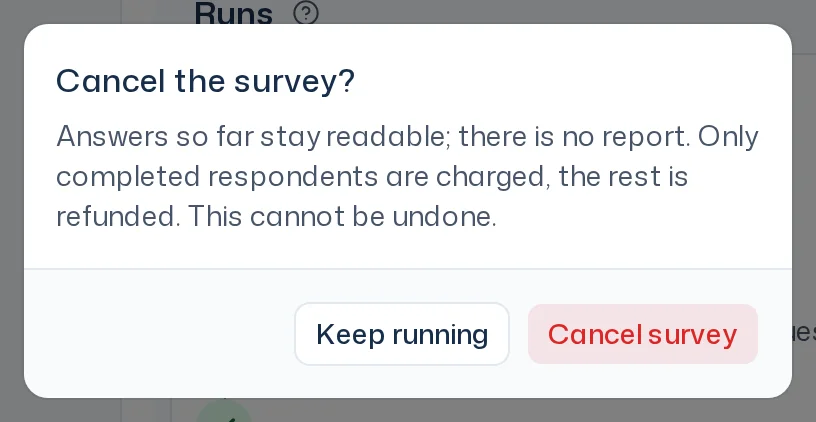
- Read the dialog Cancel the survey? and confirm with Cancel survey. Keep running lets it continue.
You can also ask Iris to cancel the survey. Iris then shows the card Cancel the survey? with the current state, for example So far at most 30 of 50 respondents complete. Iris never cancels without your click.
After the cancellation:
- The status is Abandoned, and the Overview shows, for example, Survey cancelled · 30 of 50 respondents · 20 credits refunded.
- Only respondents who had answered every question at the moment of cancellation are charged. Your team gets the rest back.
- The answers so far stay readable. There is no analysis and no report.
- The cancellation cannot be undone. Repeat creates a new survey run with the same design and the same panel.
- The person who launched the run gets the notification Survey cancelled.
If the survey had already finished when you tried to cancel, the app says The survey had already ended.
Analysis failed
If the answers are in but the analysis stops, the status is Analysis failed. The Analysis step shows the sub-step where it stopped and a reason, for example The interpretation stopped during a processing step.
Click Resume interpretation. The analysis continues where it left off. The survey does not run again and costs no further credits. If the app says Resume was not possible – the study has moved on., the analysis is already running again or has finished. Reload the Overview.
Answers that failed for technical reasons
Single answers can fail for technical reasons despite several retries. They do not count as answers:
- The report lists them separately with the question or KPI, for example No answer (technical): 3. They are not part of the base n.
- Your team gets them refunded. For every started multiple of the question count in failed answers, one respondent fewer is charged. Example: with 8 questions and 10 failed answers, your team pays for 2 respondents fewer.
- If more than 20 % of the answers to a question or KPI fail, it is marked Not interpretable. You see the distribution of the answers that did come in, but there is no reading, no themes and no evidence. The summary and recommendations do not rely on it.
How to spot such questions in the report is explained in Judge reliability.
Credits after a refund
Refunded credits go back to the pot they came from. Monthly credits from a credit month that has already ended and credits of a package that has expired in the meantime lapse as usual. You see your usage on the Usage page; more in Credits, usage & limits.