

Credits, usage & limits
How credits work, where you see usage and how credit limits apply.
Credits are the unit survey runs, ad-hoc questions and additional panels are charged in. They belong to the team: every member starts from the same balance. Owners can give individual members a ceiling, the credit limit.
What costs how much
| Action | Price |
|---|---|
| Survey run with Dynamic Personas | people × questions ÷ 15 credits |
| Survey run with Premium Twins | ten times that |
| Ad-hoc question | same as a survey run with one question |
| Recontact | free |
| Generating a panel | free while a panel slot is free; otherwise 0.30 credits per person |
| Analysis, report, changes Iris makes to a report | free |
A survey run with 15 questions to 50 Dynamic Personas costs 50 credits; with 50 Premium Twins it costs 500. You always see the price before you confirm, for example on the Start the study? card or on the Start survey run · 50 credits button. The formula with examples, the plans and the package prices are in Pricing and credits; how a launch works is in Launch & costs.
Cards, buttons and the account menu show whole credits: prices rounded up, balances rounded down, refunds exact. The Usage page shows exact values with two decimals.
When credits come back
Credits are reserved at the start. If something goes wrong, your team gets them back in full or in part:
- Survey failed: all credits come back. You get the Survey failed, Credits refunded notification.
- Survey cancelled: only respondents who had fully answered are charged, by the same formula as the full price. The rest comes back. The overview shows, for example, Survey cancelled · 30 of 50 respondents · 20 credits refunded.
- Answers that failed for technical reasons (No answer (technical)) cost nothing.
- Panel not fully generated: for an additional panel, the credits for the missing people come back; if generation fails, all of them do.
Refunded credits show up under Available credits straight away and no longer count as usage. Details in Problems & refunds.
The Usage page
Open Usage from the account menu or under Settings > Usage. What you see depends on your role.
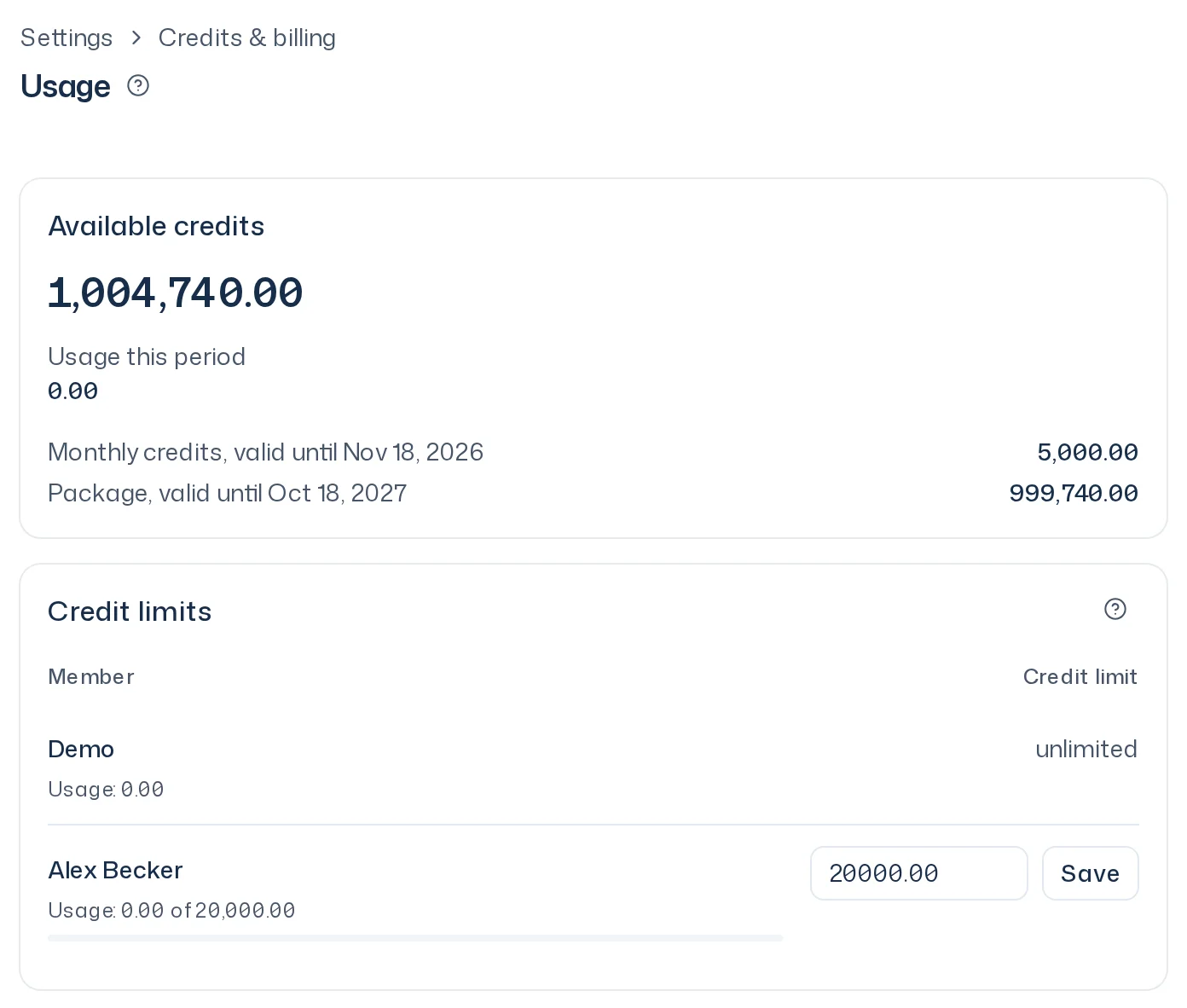
Available credits shows exactly how many credits your team can put into new starts right now, for example 1,193.33. Below it, Usage this period shows the whole team's usage to owners and their own usage to members.
Below that, the card lists exactly what the value is made of: Trial credits, the monthly credits of the current credit month with its end, such as Monthly credits, valid until Nov 3, 2026, and each package with what's left and its expiry date, such as Package, valid until Mar 1, 2027. A package is valid for 12 months from purchase. Trial credits are used first, then monthly credits, then the package that expires first. Whatever is left on the expiry date lapses. Refunds go back to the package they came from; if it has expired in the meantime, they lapse.
If the payment for a package is charged back, its remaining credits are withdrawn. Whatever your team already used from it appears on the card as Chargeback debt with a minus sign and is already deducted from your available credits. Together the lines add up exactly to your available credits. If the debt is higher than all your credits, Available credits shows 0.00. Debt does not expire. It is repaid with the next package or before the next start.
Members with a credit limit also see a Credit limit card with their limit, what's Remaining, and a bar such as Usage: 120 of 500. Below the title, members see whom to ask: More credits or a higher credit limit come from the Owners: with their names.
The period follows your team's credit source: the current credit month of the subscription or contract, or the calendar month without a subscription or contract. A change between On Demand, subscription and contract starts a new period; buying a package does not.
Set credit limits
Owners see a Credit limits card on the Usage page with one row per person and their usage.
- In a member's row, enter an amount with up to two decimals, for example
500or66.67. - Click Save. The message Credit limit saved confirms it.
An empty field means unlimited. Owners never have a limit; their row shows unlimited. People who have left appear as Left the team as long as they had usage in the period.

How a credit limit works
- It counts every survey run and ad-hoc question whose start the member confirmed, including on an integration's confirmation page. Refunds are deducted. It is calculated with the exact price, not the rounded display.
- If what's left isn't enough for a start, the member sees Your credit limit has been reached. and nothing is charged. On an integration's confirmation page, the message says how much is left and how much would be needed.
- Lowering a limit doesn't stop survey runs that have already started. It only blocks new starts.
- If a member becomes an owner or leaves the team, their limit is removed.
- A limit doesn't create credits. Even with a limit, a member can only start when the team has enough credits.
On Demand
A team without a subscription or contract is on the On Demand plan. A new team begins with 20 one-time trial credits. The account menu then shows, for example, On Demand: 12 credits remaining, rounded down to whole credits. With trial credits and valid packages you start survey runs and ad-hoc questions and generate panels. Integrations and Premium Twins need a paid plan. Once all credits are used up, the chat is locked and Buy credits takes you to billing. The plans and package prices are in Pricing and credits, the purchase in Billing.