

Project context
Record goals and guidance that Iris uses in every project chat and analysis.
Every project has Project context: a short text that applies to everything in the project, such as the research audience, the brand, a budget or how results should be compared. What applies to all your team's projects, such as industry and brands, belongs in the team context.
Where the context applies
- In every chat of the project: Iris reads the context with every message, in your chats and in those of other members.
- In every analysis: an analysis keeps the text that applied when it started, next to the team context. Changing the context afterwards only affects the next analysis.
Project context is never evidence. Questions, KPIs and every number in the report always come from respondents' answers; Iris uses project context to place the result in the summary.
Editing project context
Project context sits in the blue card at the top right of the project page. Every project member can read and edit it. The info icon explains its purpose. Long text scrolls inside the card.
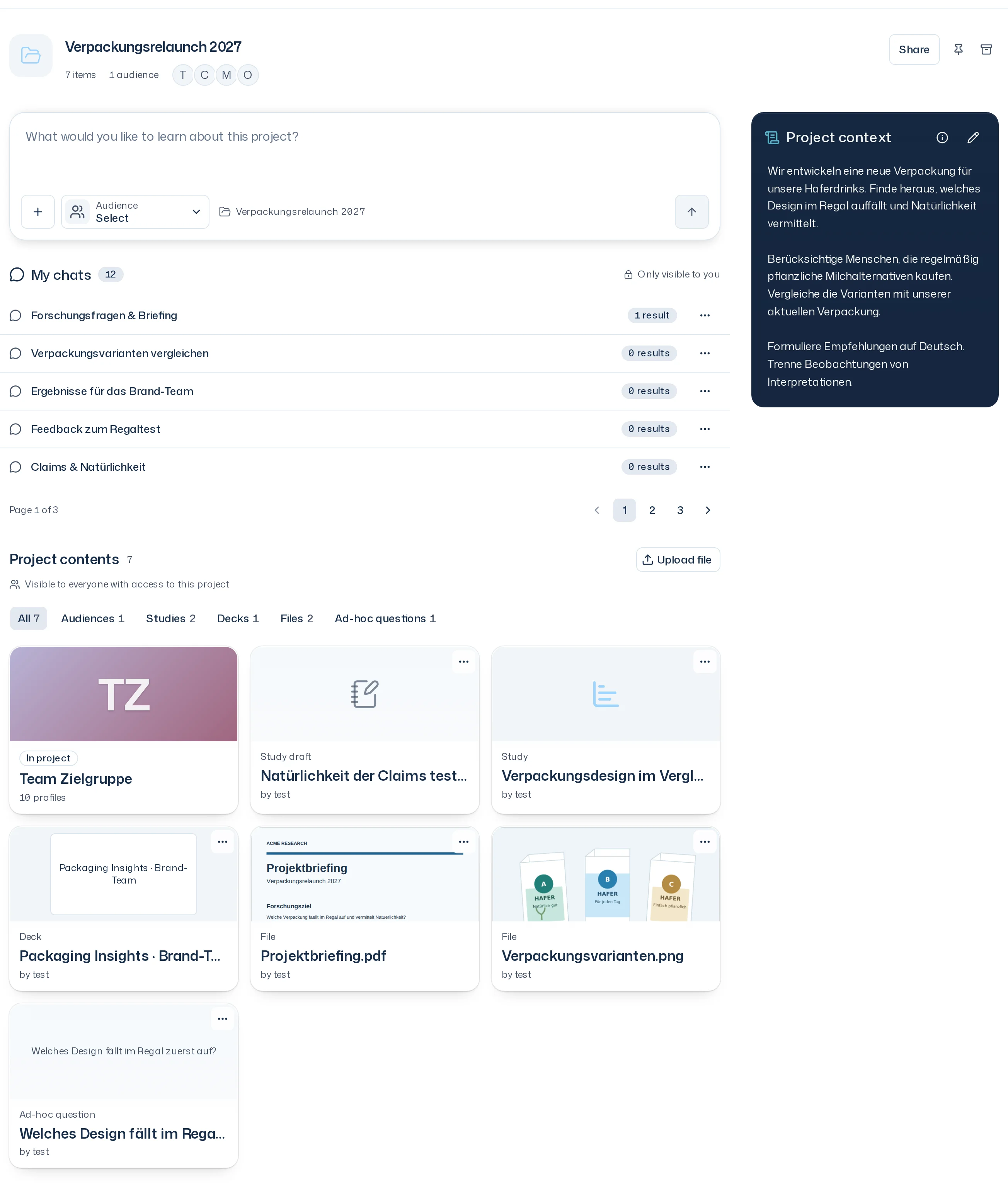
- Click the pencil (Edit project context).
- Write the text, at most 4000 characters, without formatting.
- Select Save. Cancel discards the changes. If saving fails, the draft stays open and the app reports The project context was not saved.
A project without context shows No project context yet.
Files in the project
A report's summary uses the project's files as they were when the analysis started, and names every file it takes something from. In a chat, Iris reads project files when you ask her to, for example "What does the briefing say about the audience?". She answers with sources. If something from a file should apply to every analysis, write it into project context.